
GA4 server-side migration is the hottest topic in analytics right now. Every conference I attend, every Slack community I’m in, someone asks: “Should we move to server-side tagging?” The honest answer? Most businesses don’t need it yet. But some absolutely do, and the difference between those two groups comes down to clear business metrics, not technical trends.
I’ve implemented server-side tagging for e-commerce brands doing eight figures in ad spend, and I’ve talked clients out of it when their GA4 client-side setup was working perfectly well. This guide gives you the framework I use with my own clients to make that decision.
What Is Server-Side Tagging? (The Non-Technical Version)
Think of your website’s analytics like a postal system. With client-side tagging (what most businesses use today), every letter gets handed directly from the visitor’s browser to dozens of different recipients: Google Analytics, Meta, LinkedIn, your CRM. The browser does all the sorting and delivering.
With server-side tagging, there’s a mail room in the middle. The browser sends one letter to your own server, and your server decides what goes where. It opens each envelope, checks the contents, redacts anything sensitive, and forwards only what each recipient needs.
That’s really it. Instead of 15 JavaScript tags firing in someone’s browser, you run one lightweight script that talks to your server. Your server handles the rest. Google’s Tag Manager server-side documentation walks through the technical setup, but the business concept is straightforward.

The Business Benefits (In Plain English)
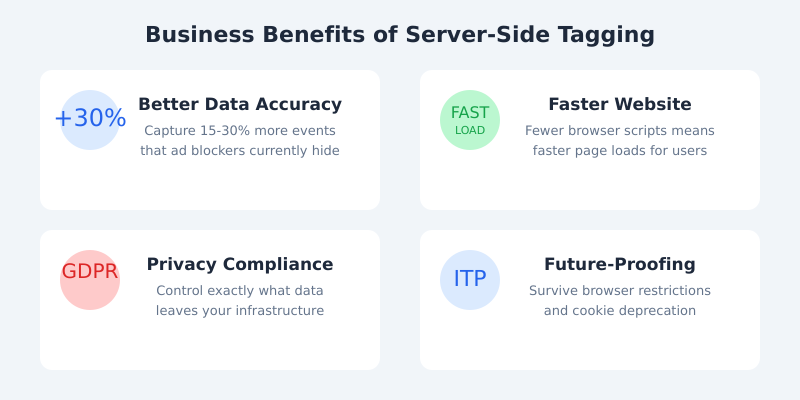
When server-side tagging works well, it delivers four tangible benefits that directly affect your bottom line.
Better Data Accuracy
Ad blockers and browser privacy features (like Apple’s Intelligent Tracking Prevention) strip out 15-30% of your analytics data. That’s not a rounding error. If you’re spending serious money on advertising, those missing conversions mean your attribution models are wrong and you’re optimising campaigns based on incomplete data.
Server-side tagging recovers most of that lost data because the tracking request comes from your own domain, not from a third-party script that ad blockers recognise.
Faster Website Performance
Every JavaScript tag on your site adds weight. I recently audited a retail client with 23 separate tracking scripts. Their page load was 6.2 seconds on mobile. After moving to server-side, we stripped it down to a single tag. Load time dropped to 3.1 seconds. Google’s Core Web Vitals research consistently shows that faster sites convert better.
Genuine Privacy Control
With client-side tagging, third-party scripts can collect data you didn’t intend to share. The Facebook pixel, for example, historically captured more than most businesses realised. Server-side puts you in control: your server acts as a gatekeeper, and you decide exactly what data reaches each platform. This is a significant advantage for UK GDPR compliance and builds genuine trust with your users.
Future-Proofing Your Stack
Browsers are getting stricter every year. Safari and Firefox already block most third-party cookies. Chrome has introduced Privacy Sandbox as a replacement. Server-side tagging moves your data collection to first-party infrastructure, making you less dependent on browser-level permissions that keep changing.
The Real Costs Nobody Talks About
Here’s where I see the most inflated expectations. Server-side tagging is marketed as a technical upgrade, but it’s really a new piece of infrastructure your business needs to own, maintain, and pay for.
Cloud Hosting
Your server-side container runs on Google Cloud Run or AWS. Costs scale with traffic:
| Monthly Sessions | Estimated Cloud Cost |
|---|---|
| 100K – 500K | £200 – £500/month |
| 500K – 2M | £500 – £1,200/month |
| 2M – 10M | £1,200 – £3,000/month |
| 10M+ | £3,000+/month |
These aren’t huge numbers for established businesses, but they’re real recurring costs that didn’t exist with client-side tagging.
Implementation
A proper server-side setup isn’t a weekend project. Budget £10,000-30,000 for implementation, depending on your tag complexity, number of marketing platforms, and QA requirements. That covers architecture, GTM server container setup, tag migration, testing, and validation. If someone quotes you £2,000, they’re either cutting corners or underestimating the scope.
Ongoing Maintenance
Someone on your team needs to own this. When Meta changes their Conversions API spec, when Google updates their GA4 endpoint, when a new marketing platform needs integrating, your server-side container needs updating. Budget 4-8 hours per month of specialist time, or retain a consultant.
When Server-Side Makes Business Sense
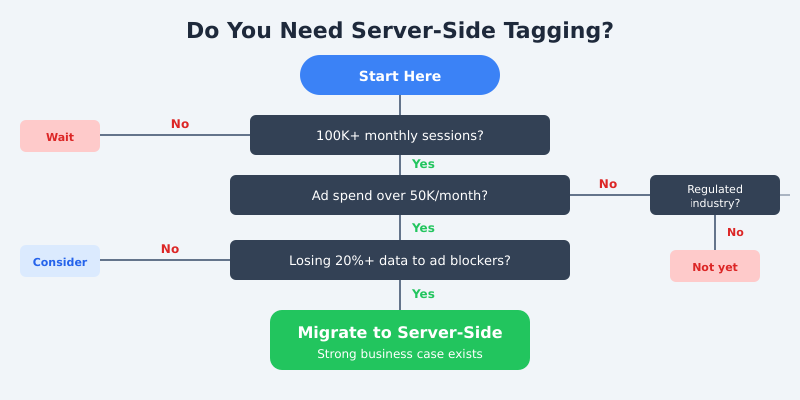
Based on dozens of implementations, here are the scenarios where server-side tagging delivers clear ROI:
High-traffic sites (100K+ monthly sessions). The cloud hosting costs become proportionally small against the value of better data. At scale, even a 1% improvement in conversion attribution can be worth thousands per month.
Significant ad spend (£50K+/month). If you’re spending heavily on Google Ads, Meta, or TikTok, data accuracy directly translates to money. Server-side tagging feeds better data into Google’s Enhanced Conversions and Meta’s Conversions API, improving your campaign optimisation.
Privacy-regulated industries. Financial services, healthcare, insurance, and any business handling sensitive data benefits from the data control layer that server-side provides.
Sites losing 25%+ of data to ad blockers. If your analytics show a significant gap between actual transactions and tracked conversions, server-side tagging closes that gap.
When You Don’t Need Server-Side (Yet)
I talk plenty of businesses out of server-side migration. Here’s when I recommend waiting:
Under 50K monthly sessions. The cloud costs and implementation investment won’t pay for themselves. Your budget is better spent on getting your GA4 client-side setup right first.
Limited or no paid advertising. If you’re not running significant ad campaigns, the data accuracy gains matter less because you’re not feeding data back into optimisation algorithms.
No compliance pressure. If you’re not in a regulated industry and your current consent management handles GDPR adequately, server-side isn’t solving an urgent problem.
Your GA4 client-side setup isn’t solid yet. This is the big one. I’ve seen businesses rush to server-side when their event tracking, data layer, and conversion setup were still broken. Server-side tagging amplifies what you already have. If your foundations are messy, you’ll just be sending messy data through a more expensive pipe. Fix client-side first, then migrate.
The Migration Roadmap
If the business case checks out, here’s the phased approach I use with clients. The whole process typically takes 6-10 weeks.
Phase 1: Audit Your Current Setup (Week 1-2)
Before touching server-side, document everything. Map every tag, trigger, and variable in your current GTM container. Identify which platforms receive data. Measure your current data loss by comparing server logs or transaction records against GA4 reports. This audit becomes your baseline for measuring improvement.
Phase 2: Pilot With Key Events (Week 3-5)
Don’t migrate everything at once. Start with your most valuable events: purchases, lead submissions, or sign-ups. Run server-side and client-side in parallel so you can compare data quality. This dual-running period is critical for building confidence in the new setup.
Phase 3: Full Migration (Week 6-8)
Once the pilot data validates the approach, migrate remaining tags: pageviews, scroll tracking, video engagement, custom events. Configure all advertising platform integrations (Enhanced Conversions, Meta Conversions API, etc.) through the server container.
Phase 4: Decommission and Optimise (Week 9-10)
Remove redundant client-side tags. Verify that all data flows are clean. Set up monitoring and alerting so you’ll know if a server-side tag fails. Document the new architecture for your team. Run a final data quality comparison against your Phase 1 baseline.

Frequently Asked Questions
How much does GA4 server-side tagging cost per month?
Cloud hosting typically runs £200-3,000/month depending on your traffic volume. Add implementation costs of £10-30K upfront and 4-8 hours/month of specialist maintenance. For a mid-sized e-commerce site with 500K monthly sessions, expect around £500-800/month in ongoing infrastructure costs.
Does server-side tagging completely bypass ad blockers?
Not completely, but it recovers most lost data. Because server-side requests come from your own domain rather than recognisable third-party endpoints, most ad blockers don’t flag them. Typical data recovery is 15-30% of previously blocked events, though results vary by audience and industry.
Can I run server-side and client-side tagging simultaneously?
Yes, and you should during migration. Running both in parallel lets you compare data quality and catch discrepancies before fully committing. Most businesses run dual setups for 2-4 weeks during the pilot phase. Just ensure you’re not double-counting events in your reports.
Is server-side tagging required for GDPR compliance?
No, server-side tagging isn’t a GDPR requirement. You can be fully compliant with client-side tagging and a proper consent management platform. However, server-side gives you stronger data governance because you control exactly what personal data reaches third parties, which simplifies compliance audits considerably.
Do I need a developer to maintain server-side tagging?
You need someone with GTM server-side expertise, which sits between traditional marketing and development. This could be a senior analytics engineer, a technical marketing specialist, or an external consultant. The maintenance isn’t heavy (4-8 hours/month typically), but it does require someone who understands both the tag management and cloud infrastructure sides.
The Bottom Line
Server-side tagging is a genuine step forward for web analytics. It solves real problems around data accuracy, site performance, and privacy control. But it’s infrastructure, not magic. It costs real money, requires real expertise, and adds real complexity to your analytics stack.
Don’t migrate because it’s trendy or because a vendor told you to. Migrate because the business case is clear: you’re losing enough data to affect decisions, you’re spending enough on ads to justify the investment, or your compliance requirements demand tighter data control.
If you’re unsure where you stand, start with the decision tree above. And if you’d like a second opinion on whether server-side makes sense for your specific situation, get in touch. I’m always happy to give an honest assessment, even when the answer is “not yet.”